The heat setting number displayed changes between two levels, Induction Cooktop
Issue
The heat setting changes between two levels.
Applies to
- Induction Cooktop
Solution
Possible cause
- The Power management is activated
Power management
- Power management divides the power between the front and rear zones for each of the 2 outer modules. See illustration below:
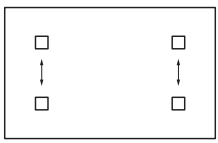
- This allows either the front or rear zone to draw power from the other, if maximum power is required.
- The heat setting of the cooking zone selected first is always prioritised. The remaining power will be divided between the previously activated cooking zones according to the order of selection.
- For cooking zones that have a reduced power, the control bar blinks and shows the maximum possible heat settings.
- Wait until the display stops flashing or reduce the heat setting of the cooking zone selected last. The cooking zones will continue operating with the reduced heat setting. Change the heat settings of the cooking zones manually, if necessary.
- To enable 2 pots to be set to boost, P, or high heat setting, place a pot on the left zone and a pot on the right zone.
Was this article helpful?
Related Articles
- Oven displays error F908, F113
- Oven displays error F101 or F102
- The Hob2Hood function does not work with the cooker hood
- How to use - The Quick Start Guide for your Oven (Video)
- How to use you TFT Touch Control panel - Video
- Discoloured marks or bubbles ceramic glass cleaning tips - Video
- How to use the Steam Cooking Functions - (video)
- How to Set the clock - Full touch electronic control (Video)
- How to use 2-level AirFry - (Video)
- How to use BoilProtect - (Video)
Related Articles
- Oven displays error F908, F113
- Oven displays error F101 or F102
- The Hob2Hood function does not work with the cooker hood
- How to use - The Quick Start Guide for your Oven (Video)
- How to use you TFT Touch Control panel - Video
- Discoloured marks or bubbles ceramic glass cleaning tips - Video
- How to use the Steam Cooking Functions - (video)
- How to Set the clock - Full touch electronic control (Video)
- How to use 2-level AirFry - (Video)
- How to use BoilProtect - (Video)