How to use 2-level AirFry - (Video)
Issue
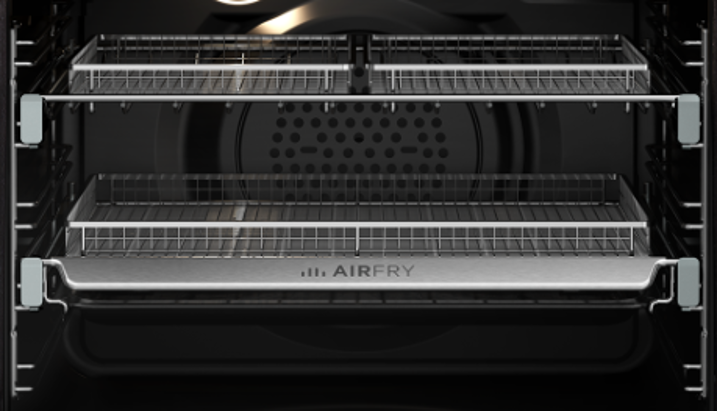
How to use 2-level AirFry
Applies to
- Built-in Oven
- Freestanding oven
Solution
Learn how to use your Westinghouse ovens double AirFry trays.
To set the AirFry function:
- Arrange food on to the AirFry tray.
- Select AirFry setting and suggested temperature from the table below.
- For best results pre-heat the oven.
- When the oven reaches the set temperature place the AirFry tray on the suggested oven shelf position.
- Note: Set the minute minder for the minimum suggested time and check for desired results when timer ends.
- When cooking is complete turn the oven off.
- Clean the AirFry tray after each use. Wash the tray in the sink with warm soapy water and a stainless steel scourer.
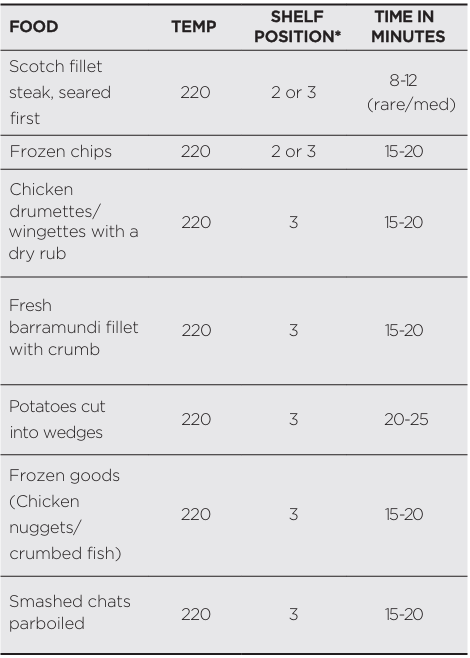
*Count shelf position from the bottom up.
Was this article helpful?
Related Articles
- The Hob2Hood function does not work with the cooker hood
- How to use - The Quick Start Guide for your Oven (Video)
- How to use you TFT Touch Control panel - Video
- Discoloured marks or bubbles ceramic glass cleaning tips - Video
- How to use the Steam Cooking Functions - (video)
- How to Set the clock - Full touch electronic control (Video)
- How to use BoilProtect - (Video)
- How to set Timer and delayed start - TFT Touch Control panel - (Video)
- How to use the PyroClean function - (Video)
- How to Set your Clock Time – Touch control / 3 button clock (Video)
Related Articles
- The Hob2Hood function does not work with the cooker hood
- How to use - The Quick Start Guide for your Oven (Video)
- How to use you TFT Touch Control panel - Video
- Discoloured marks or bubbles ceramic glass cleaning tips - Video
- How to use the Steam Cooking Functions - (video)
- How to Set the clock - Full touch electronic control (Video)
- How to use BoilProtect - (Video)
- How to set Timer and delayed start - TFT Touch Control panel - (Video)
- How to use the PyroClean function - (Video)
- How to Set your Clock Time – Touch control / 3 button clock (Video)