How to install telescopic runners | Westinghouse ovens
Issue
Learn how to install the telescopic runners of your Westinghouse oven
Applies to
- Built in oven
- Freestanding Oven
Solution
Slides (telescopic runners)
1. Your oven is supplied with a set of slides and instructions on how to assemble. Ensure the rack and slides are of the same hand. E.g. left-hand slide should be fitted on the left-hand rack.
2. The instructions also show recommended slide positions on the rack. Installing the slides (telescopic runners)
Installing the slides (telescopic runners)
Obtain left hand side rack and left-hand slide – see image to identify
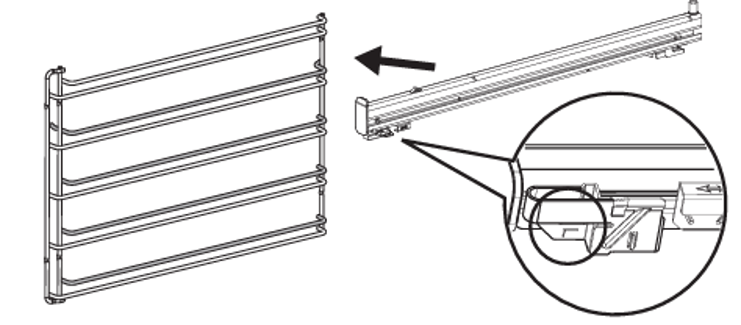
The shaded wires indicate the wire the slide can be mounted on. Fit slide rear clips to the rear of wire at an angle as shown below
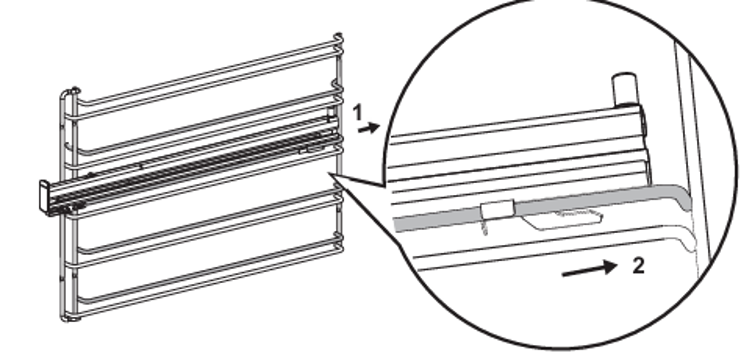
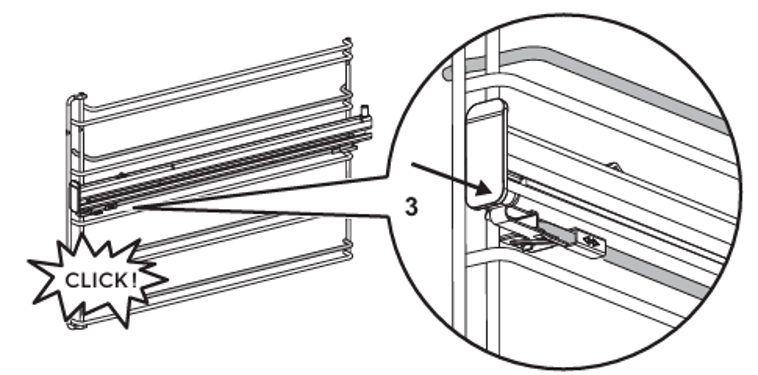
Push slide front clip over wire until secured
Learn how to install the telescopic runners of your Westinghouse oven in this video.
Was this article helpful?
Related Articles
- Oven displays error F908, F113
- Oven displays error F101 or F102
- The Hob2Hood function does not work with the cooker hood
- How to use - The Quick Start Guide for your Oven (Video)
- How to use you TFT Touch Control panel - Video
- Discoloured marks or bubbles ceramic glass cleaning tips - Video
- How to use the Steam Cooking Functions - (video)
- How to Set the clock - Full touch electronic control (Video)
- How to use 2-level AirFry - (Video)
- How to use BoilProtect - (Video)
Related Articles
- Oven displays error F908, F113
- Oven displays error F101 or F102
- The Hob2Hood function does not work with the cooker hood
- How to use - The Quick Start Guide for your Oven (Video)
- How to use you TFT Touch Control panel - Video
- Discoloured marks or bubbles ceramic glass cleaning tips - Video
- How to use the Steam Cooking Functions - (video)
- How to Set the clock - Full touch electronic control (Video)
- How to use 2-level AirFry - (Video)
- How to use BoilProtect - (Video)