Save Power Mode – Activate/ Deactivate
Issue
How to activate or deactivate saving power mode
Applies to
- WSF6606XB
- WSF6606KXB
- WSF6608XB
- WSF6608KXB
- WSU6608XB
- WSU6608KXB
Solution
When Save Power Mode is activated, the interior lights (if available) will turn off 2 minutes after the door is opened, and the machine will turn off 15 minutes after any intervention to save energy.
When Save Power Mode is deactivated, interior lights will be on as long as the door is open, and the machine will always be on unless it is turned off by user.
Note: In factory setting, Save Power Mode is active.
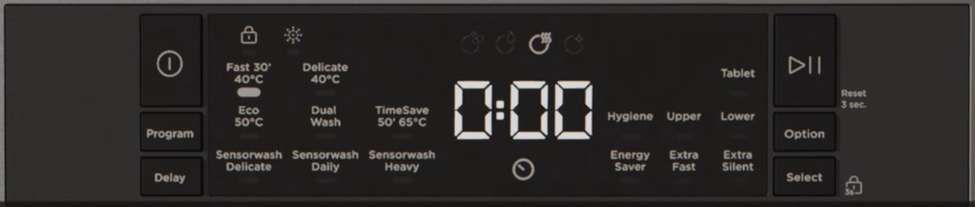
To activate or deactivate saving power mode, follow the following steps:
1. Open the door and press Program and Option buttons at the same time for 3 seconds.
2. After 3 seconds, the machine will display last Setting, “IL1” or “IL0”.
3. When Save Power Mode is activated, “IL1” will be displayed
4. When Save Power Mode is deactivated “IL0” will be displayed.
5. To save the selected setting, turn off the machine.
Was this article helpful?
Related Articles
- Discoloration of silver or aluminium items after washing in the dishwasher
- Dishwasher drain hose extension
- Dishwasher displays E - Error Code number – Troubleshoot
- How to stack your dishwasher - (Video)
- Lights flashing on the display – wash cycle will not start
- Dishwasher displays Error E1
- Dishwasher leaking from appliance door
- Dishwasher displays F Error Code number– Troubleshoot
- Dishwasher - Why should I use Rinse Aid?
- Internal light in the dishwasher is not working
Related Articles
- Discoloration of silver or aluminium items after washing in the dishwasher
- Dishwasher drain hose extension
- Dishwasher displays E - Error Code number – Troubleshoot
- How to stack your dishwasher - (Video)
- Lights flashing on the display – wash cycle will not start
- Dishwasher displays Error E1
- Dishwasher leaking from appliance door
- Dishwasher displays F Error Code number– Troubleshoot
- Dishwasher - Why should I use Rinse Aid?
- Internal light in the dishwasher is not working