How To Adjust the Dryness Level – Heat Pump Dryer (Video)
Issue
How To Adjust the Dryness Level
Applies to
- Heat Pump Dryer
Solution
Adjustment of remaining laundry moisture
The appliance allows you to choose between 3 levels corresponding to different ranges of water hardness.
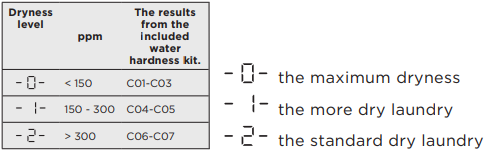
To change the ‘default’ degree of remaining moisture:
1. Press the on/off button to activate the appliance.
2. Use the program knob to set any program.
3. Wait approximately 8 seconds.
4. Press and hold buttons ‘Reverse Plus touch button’ and ‘Extra Anticrease touch button’ at the same time. The Dryness level will be displayed.
5. Press and hold buttons ‘Reverse Plus touch button’ and ‘Extra Anticrease touch button’ at the same time again until the indicator of the level displays the dryness level you want to select.
6. After 5s the display returns to normal mode.
The default adjustment of reaming laundry moisture is now set permanently for all drying cycles.
Note:
Every time you enter in the “Adjustment of remaining laundry moisture” mode, previously set degree of remaining moisture will change into next value (e.g.: previously set -2-will change to -1-
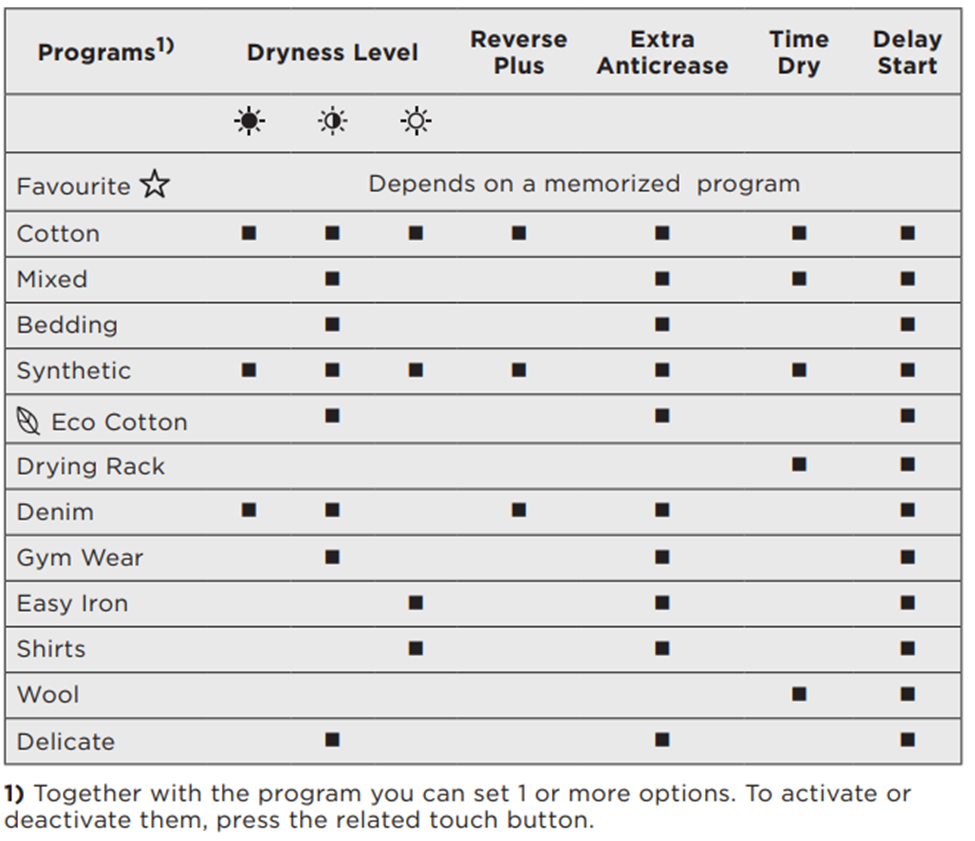
The dryness level - This function helps to increase dryness of the laundry.
There are 3 options: Extra Dry, Cupboard Dry, Iron Dry
This option can be selected for on compatible functions – See list below
Was this article helpful?
Related Articles
- Washing machine does not start
- Excessive moisture, on walls and windows where the tumble dryer is located
- Tumble Dryer noisy drum / knocking noise during drum rotation
- Tumble dryer displays a padlock
- Control panel touch pad is not responding - Top Loader Washing Machine
- Care and cleaning the washing machine’s rubber door seal
- Washing machine does not take detergents / water remains in the softener compartment
- Tumble dryer is leaking
- The washing cycle is shorter / longer than indicated on the display
- Drying Rack – How to install and use drying rack program
Related Articles
- Washing machine does not start
- Excessive moisture, on walls and windows where the tumble dryer is located
- Tumble Dryer noisy drum / knocking noise during drum rotation
- Tumble dryer displays a padlock
- Control panel touch pad is not responding - Top Loader Washing Machine
- Care and cleaning the washing machine’s rubber door seal
- Washing machine does not take detergents / water remains in the softener compartment
- Tumble dryer is leaking
- The washing cycle is shorter / longer than indicated on the display
- Drying Rack – How to install and use drying rack program