How to add clothes to a wash cycle in progress Front Load Washer (Video)
Issue
How to add clothes to wash cycle in progress.
Applies to
- Front Load Washing Machine
Solution
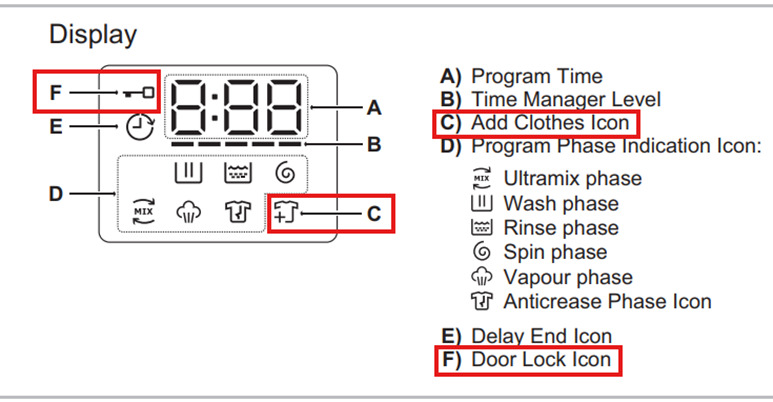
You can only add clothes icon is shown on the display.
To pause cycle to add clothes
1. Pressing the “Start/Pause” touchpad to pause the program.
2. Wait for door lock icon to turn off.
3. Add clothing and close the door.
4. Resume the program by pressing “Start/Pause” touchpad again.
Was this article helpful?
Related Articles
- Washing machine does not start
- Excessive moisture, on walls and windows where the tumble dryer is located
- Tumble Dryer noisy drum / knocking noise during drum rotation
- Tumble dryer displays a padlock
- Control panel touch pad is not responding - Top Loader Washing Machine
- Care and cleaning the washing machine’s rubber door seal
- Washing machine does not take detergents / water remains in the softener compartment
- Tumble dryer is leaking
- The washing cycle is shorter / longer than indicated on the display
- Drying Rack – How to install and use drying rack program
Related Articles
- Washing machine does not start
- Excessive moisture, on walls and windows where the tumble dryer is located
- Tumble Dryer noisy drum / knocking noise during drum rotation
- Tumble dryer displays a padlock
- Control panel touch pad is not responding - Top Loader Washing Machine
- Care and cleaning the washing machine’s rubber door seal
- Washing machine does not take detergents / water remains in the softener compartment
- Tumble dryer is leaking
- The washing cycle is shorter / longer than indicated on the display
- Drying Rack – How to install and use drying rack program