How to activate AutoDoor opener - Video
Issue
How to activate AutoDoor opener
Applies to
- WSF6606XB
- WSF6606KXB
- WSF6608XB
- WSF6608KXB
- WSU6608XB
- WSU6608KXB
Solution
To allow your dishes to dry quicker, activate AutoDoor, select the Energy Saver ‘option’ to enable AutoDoor opening at the end of the program, to increase drying efficiency.
This function also saves energy by operating at a lower temperature.
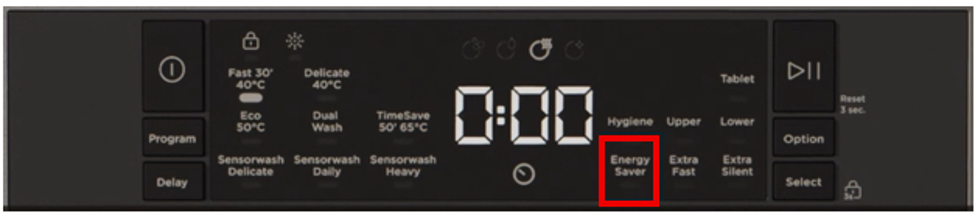
AutoDoor is enabled by press of Energy Saver button after selecting the wash program
- Energy Saver led lights up before starting the program.
- Energy Saver option can be activated with all programs except Prewash and Steam Wash.
Energy save option is disabled by pressing Energy Saver button until Energy saver led turns off.
Note: During a program in progress, the energy saver option cannot be cancelled or cannot be added. If user presses energy save button during program, the buzzer gives a long sound that is activated to warn that this is not a valid command.
Was this article helpful?
Related Articles
- Discoloration of silver or aluminium items after washing in the dishwasher
- Dishwasher drain hose extension
- Dishwasher displays E - Error Code number – Troubleshoot
- How to stack your dishwasher - (Video)
- Lights flashing on the display – wash cycle will not start
- Dishwasher displays Error E1
- Dishwasher leaking from appliance door
- Dishwasher displays F Error Code number– Troubleshoot
- Dishwasher - Why should I use Rinse Aid?
- Internal light in the dishwasher is not working
Related Articles
- Discoloration of silver or aluminium items after washing in the dishwasher
- Dishwasher drain hose extension
- Dishwasher displays E - Error Code number – Troubleshoot
- How to stack your dishwasher - (Video)
- Lights flashing on the display – wash cycle will not start
- Dishwasher displays Error E1
- Dishwasher leaking from appliance door
- Dishwasher displays F Error Code number– Troubleshoot
- Dishwasher - Why should I use Rinse Aid?
- Internal light in the dishwasher is not working