Dishwasher displays Error F2
Issue
Dishwasher displays Error F2
Applies to
- Dishwasher
Solution
F2 - Inability to discharge water
Possible cause
Water discharge installation or blockage
Filters may be clogged.
Blocked waste water pump
Cancel the program.
- First, always disconnect the appliance from the power supply.
Check and clean filters and waste water pump
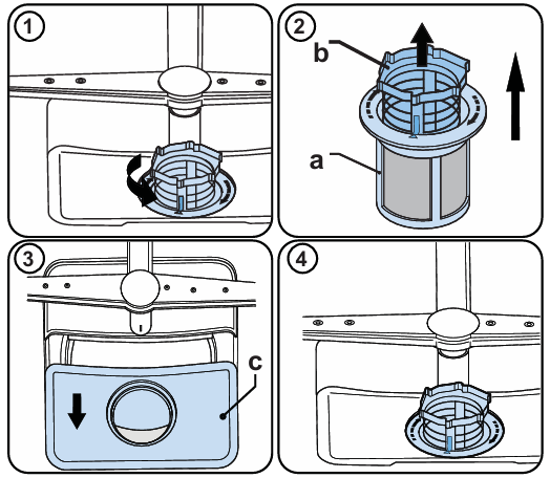
Clean the filters and spray arms at least once a week. If any food waste remains or foreign objects on the coarse and fine filters, remove them and clean them thoroughly with water.
- Micro filter
- Course filter
- Metal filter
1 To remove and clean the filter combination, turn it counter clockwise and remove it by lifting it upwards.
2 Pull the coarse filter out of the micro filter
3 Then pull and remove the metal filter
Rinse the filters with lots of water until they are free of residue.
Reassemble the filters.
4 Replace the filter insert, and rotate it clockwise
Note:
• Never use your dishwasher without a filter.
• Incorrect fitting of the filter will reduce the washing effectiveness.
• Clean filters are necessary for proper running of the machine
Waste Water pump
- When cleaning the waste water pump, ensure that you do not injure yourself on pieces of broken glass or pointed implements.
Remove basket and filters.
Scoop out water, use a sponge if required.
Check the area and remove any foreign objects
Install filters and re-insert basket
Check the installation of the drain hose
The water drain hose can be connected either directly to the water drain hole or to the sink outlet spigot. Using a hose hook (if available), the water can be drained directly into the sink by positioning the hose hook over the edge of the sink. This connection should be at a minimum of 50 cm and at a maximum of 110 cm above the base of the dishwasher.
Maximum drain hose length is 4m. Longer hose length will prevent correct draining, and result in poor wash performance.
If you connect the water drain hose to a trap spigot under the sink, ensure the plastic membrane has been removed. If you do not remove the entire membrane, remaining food can cause a blockage in the drain hose spigot.
Contact an Authorized Service Centre.
If the above steps don't resolve the issue, we recommend contacting an Authorized Service Center.
Was this article helpful?
Related Articles
- Discoloration of silver or aluminium items after washing in the dishwasher
- Dishwasher drain hose extension
- Dishwasher displays E - Error Code number – Troubleshoot
- How to stack your dishwasher - (Video)
- Lights flashing on the display – wash cycle will not start
- Dishwasher displays Error E1
- Dishwasher leaking from appliance door
- Dishwasher displays F Error Code number– Troubleshoot
- Dishwasher - Why should I use Rinse Aid?
- Internal light in the dishwasher is not working
In Warranty Service & Repair
Need to arrange a repair technician visit? Repairs under warranty are free of charge and we are here to support you after your warranty has expired. Authorised Technicians and genuine parts for complete peace of mind.
Related Articles
- Discoloration of silver or aluminium items after washing in the dishwasher
- Dishwasher drain hose extension
- Dishwasher displays E - Error Code number – Troubleshoot
- How to stack your dishwasher - (Video)
- Lights flashing on the display – wash cycle will not start
- Dishwasher displays Error E1
- Dishwasher leaking from appliance door
- Dishwasher displays F Error Code number– Troubleshoot
- Dishwasher - Why should I use Rinse Aid?
- Internal light in the dishwasher is not working