Quad Door Fridges | How to maintain your fridge
Issue
Quad Door Fridges | How to maintain your fridge.
Solution
To keep your Quad Door Fridge looking and working its best, you should conduct regular maintenance to keep it clean and to avoid any build up of bacteria.
Doors and Exterior
You should only clean the doors with lukewarm soapy water and a soft cloth.
Interior
Clean the inside of your refrigerator regularly with a soft cloth, unscented mild soap and lukewarm water. Thoroughly dry all surfaces and removable parts and avoid getting water on the controls. Replace removable parts, plug power cord in and switch the power on before returning the food.
Door seals
Always keep door seals clean by washing them with a mild detergent and warm water, followed by a thorough drying. Sticky food and drink can cause seals to stick to the cabinet and tear when you open the door.
Never use hot water, solvents, commercial kitchen cleaners, aerosol cleaners, metal polishes, caustic or abrasive cleaners, or scourers to clean your refrigerator. Many commercially available cleaning products and detergents contain solvents that will damage your refrigerator. Use only a soft cloth with ‘unscented mild soap’ and lukewarm water.
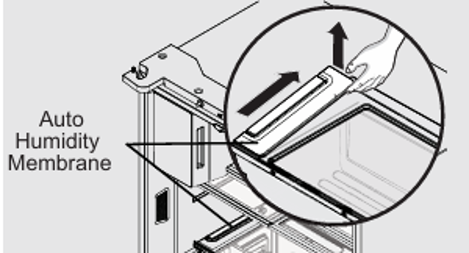
To remove the auto humidity control membrane
Flip Shelf
1. Reach to back of humidity control cover.
2. Pull up on cover.
3. Pull cover towards back of cabinet and remove.
4. Replace humidity membrane.
5. Replace cover by reversing the steps above. Repeat for both crispers.
Replacing your Air Filter
To ensure optimal filtering of refrigerator odors, you should change the air filter six months (The filter status light on the Touch Panel prompts you to replace the filter after six months)
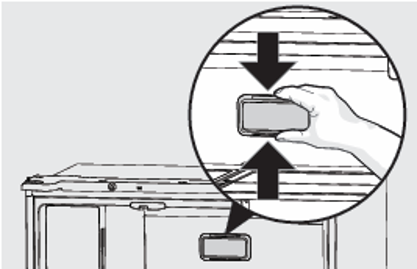
1. Remove the air filter cover by squeezing the sides of the cover together and removing it from the liner
2. Remove the old filter and discard it.
3. Unpack the new filter and slide it into the housing. The open face must (carbon media) of the filter should be installed facing the air port (hole) in the multiflow.
4. Replace the air filter cover by squeezing the sides and snapping it back into place.
5. Press and hold the “Reset Air Filter” button on the control panel for three seconds. When the LED turns off, the status has been reset.
Water Filter
The water filter is located at the top right side of the fresh food compartment.
Note:
- When ordering your replacement filter, please reorder the same filter type that is currently in your refrigerator.
- It is not necessary to turn the water supply off to change the filter. Be ready to wipe up any small amounts of water released during the filter replacement.
To Remove: Pull cover towards you and cover will drop down and allow access to filter.
To Reinstall: Push cover up towards liner and then push towards rear of cabinet. Filter cover will snap back into place.
1. Ensure that the ice maker is turned off
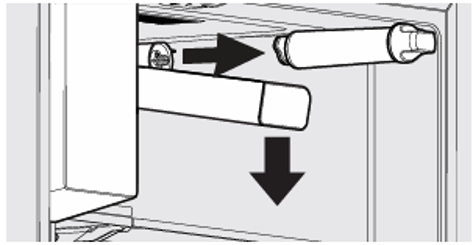
2. Remove the filter by turning anti clockwise 180˚
3. Slide the old water filter cartridge straight out of the housing and discard it.
4. Unwrap the new filter cartridge and using the alignment guide, slide it gently into filter housing until it stops against the filter connection at the back of the housing.
5. Engage the filter by firmly rotating clockwise until the filter snaps into position (once engaged the filter cannot be rotated further).
6. Press a drinking glass against the water dispenser while checking for any leaks at the filter housing. Any spurts and sputters that occur as the system purges air out of the dispenser system are normal.
7. After filling one glass of water, continue flushing the system for about four minutes. 8. Turn on the ice maker.
9. When the filter has been replaced press and hold the ‘Reset Water Filter’ button for three seconds to reset the filter replace timer.
10. Replace filter cover by pushing up and snapping into place.
Was this article helpful?
Related Articles
- How to install your Quad Door Fridge
- Temperature in the refrigerator is too low, freezing in the crisper bins
- Ice maker is not making any ice
- The fridge is beeping and door alarm is on the display
- The LED lighting not working or dim in my fridge-freezer
- How to Align and level the cabinet and doors - multi-door
- Sb, 56 or 5b Displays in UI and Freezer Light/Fridge Light/ VCZ light and Dispenser light is not working, no functions can be changed or activated
- Unpleasant odour smell in the Fridge or Freezer
- Strange noises from fridge/freezer
- Ice clumping, ice not dispensing, bad taste in ice, odd shaped ice
Related Articles
- How to install your Quad Door Fridge
- Temperature in the refrigerator is too low, freezing in the crisper bins
- Ice maker is not making any ice
- The fridge is beeping and door alarm is on the display
- The LED lighting not working or dim in my fridge-freezer
- How to Align and level the cabinet and doors - multi-door
- Sb, 56 or 5b Displays in UI and Freezer Light/Fridge Light/ VCZ light and Dispenser light is not working, no functions can be changed or activated
- Unpleasant odour smell in the Fridge or Freezer
- Strange noises from fridge/freezer
- Ice clumping, ice not dispensing, bad taste in ice, odd shaped ice