How to change temp display for Celsius / Farenheight
Issue
How to change temp display for Celsius or Farenheight
Applies to
- Refrigeration - Electronic Control Display Models
Solution
External Electronic Control Display
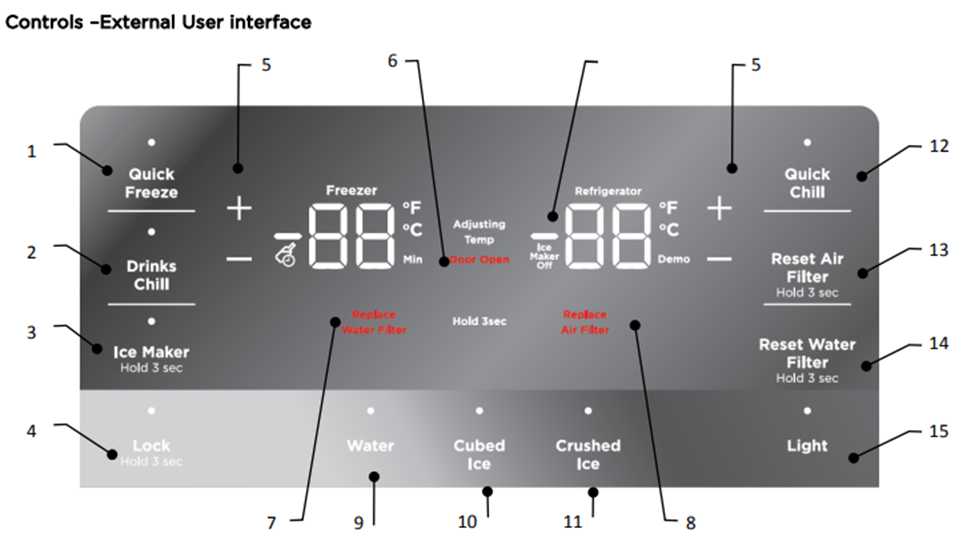
Press and hold for 5 seconds + and - on the refrigerator side. A tone will be heard. The display will then revert to either °F or °C mode
Internal Electronic Control Display
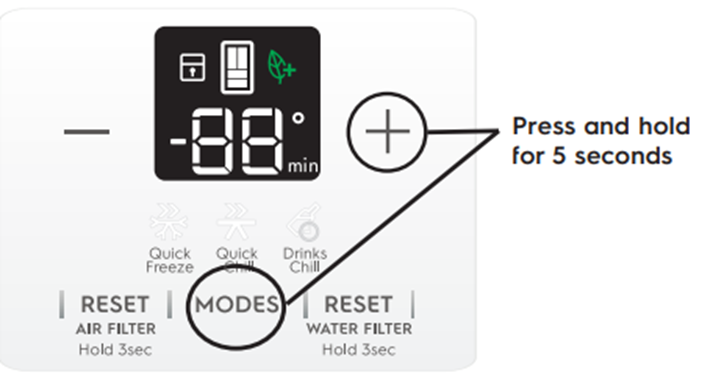
Press and hold for 5 seconds “+” and “Mode” Buttons
The display will change to “°F or °C”
Was this article helpful?
Related Articles
- How to install your Quad Door Fridge
- Temperature in the refrigerator is too low, freezing in the crisper bins
- Ice maker is not making any ice
- The fridge is beeping and door alarm is on the display
- The LED lighting not working or dim in my fridge-freezer
- How to Align and level the cabinet and doors - multi-door
- Sb, 56 or 5b Displays in UI and Freezer Light/Fridge Light/ VCZ light and Dispenser light is not working, no functions can be changed or activated
- Unpleasant odour smell in the Fridge or Freezer
- Strange noises from fridge/freezer
- Ice clumping, ice not dispensing, bad taste in ice, odd shaped ice
Related Articles
- How to install your Quad Door Fridge
- Temperature in the refrigerator is too low, freezing in the crisper bins
- Ice maker is not making any ice
- The fridge is beeping and door alarm is on the display
- The LED lighting not working or dim in my fridge-freezer
- How to Align and level the cabinet and doors - multi-door
- Sb, 56 or 5b Displays in UI and Freezer Light/Fridge Light/ VCZ light and Dispenser light is not working, no functions can be changed or activated
- Unpleasant odour smell in the Fridge or Freezer
- Strange noises from fridge/freezer
- Ice clumping, ice not dispensing, bad taste in ice, odd shaped ice